


Sensi
4.411.12K Reviews
App Specs
- Version
- 9.7.2
- Updated On
- License
- Free
- Downloads
- 1,000,000+
- Developer
- Copeland LP
- Categories
- Lifestyle
- Platform
- Android, iOS
Screenshots



 Analysis by AppCompare
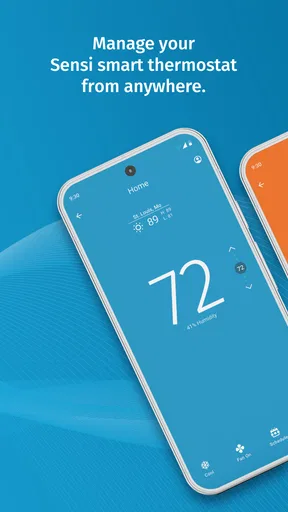
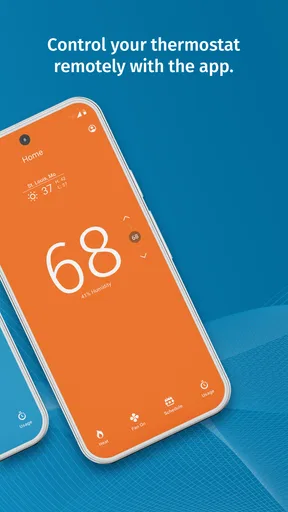
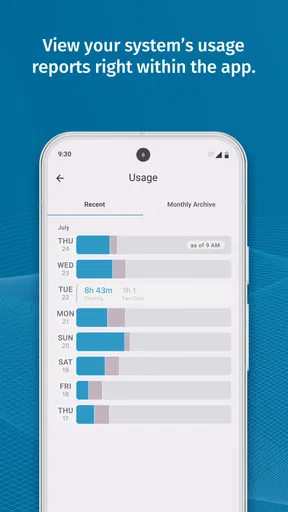
When I use a smart thermostat app, I am not looking for a screen full of controls. I want to change the temperature without walking across the house, check whether the heating or cooling is still running, and make a quick adjustment when my plans change. That is the useful idea behind Sensi, a free lifestyle app from Copeland LP for people with a compatible Sensi thermostat.
Its central capability is remote home-comfort control. The app turns a phone into a practical companion for the thermostat already installed in your home, so the value comes from convenience rather than from trying to replace the thermostat itself. In my experience, that makes it most appealing to households that often arrive home at different times, want to check the indoor setting while away, or simply dislike getting up to make small changes.
Sensi has been available since January 29, 2014, and its current version is 9.7.2. It has built a substantial audience, with more than a million installs, about a 4.4 average from roughly forty-nine thousand ratings, and around eleven thousand written reviews. Those figures suggest that the app is familiar to many thermostat owners, although popularity alone does not guarantee that it will suit every heating and cooling setup.
Remote control is the feature that changes the routine
I find remote control most valuable when the house and my schedule stop lining up: a delayed trip home, an early departure, or a setting I want to check after I have left. The useful question is not how often I can tap the app, but whether that access prevents a needless detour or second-guessing. That everyday test leads naturally to what the experience feels like once the phone is part of the routine.
What the main capability means at home
The strongest reason to use Sensi is that temperature control moves from a fixed wall location to a device I already carry. Instead of waiting until I get home to adjust the thermostat, I can handle the change before I arrive. If the house feels too warm, I can make a correction without searching for the thermostat. If I am leaving and realize the setting is not where I want it, I can check it remotely rather than relying on memory.
That sounds simple, but the effect is different from the usual thermostat experience. A traditional control is tied to one room and one moment. The app adds a layer of awareness: I can make a decision based on my schedule instead of the thermostat’s location. This is especially useful in homes where the thermostat is upstairs, in a hallway, or somewhere I do not pass regularly.
I also see the remote function as a way to reduce unnecessary trips rather than as a feature I would constantly use. Most of the time, a thermostat should fade into the background. Sensi earns its place when a small adjustment matters: before bed, before leaving for work, after an unexpected change of plans, or when somebody at home asks for a different setting.
Worth Reading Before You Choose

EA SPORTS FC Mobile 26 Is a Bigger Football Game, but It Takes Time

Flipboard Shows What News Apps Must Do Beyond the Feed

Switching to Android Auto Means Rethinking Your Driving Routine

Google Calendar Makes a Crowded Week Easier to Manage

Ludo King Makes the Most of the Minutes Between Plans

Baby Panda World Brings Quick Play to Modern Phones, but Its Game Library Feels Busy
Where it fits among ordinary alternatives
The obvious alternative is the thermostat’s own buttons or display. That option remains faster when I am standing beside the unit, and it does not depend on opening a phone. For a person who never changes settings away from home, a dedicated control may be all that is needed.
Sensi makes more sense when convenience is the priority. Compared with checking the thermostat manually, remote access removes the need to be physically present. Compared with a general home-control solution, its narrower purpose can be an advantage: I am opening it to deal with indoor comfort, not navigating a large collection of unrelated devices.
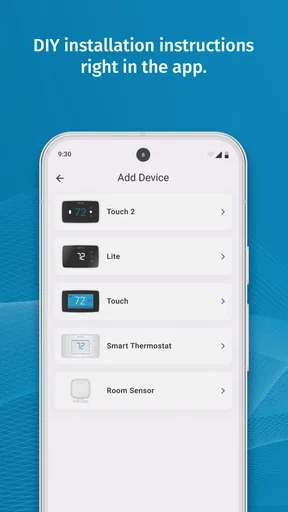
That focus also defines its limits. This is not a universal remote for every brand of thermostat, and it is not a substitute for a compatible Sensi unit. Anyone choosing an app before checking hardware compatibility is approaching the decision backwards. The thermostat in the home is the foundation; the phone app is the convenience layer.
The small habit that makes remote control worthwhile
I would not install this simply to say that I have a smart-home app. I would install it after identifying one repeated annoyance. Perhaps I regularly leave work at different times, or perhaps the thermostat is in a part of the house I rarely visit. Once that annoyance is clear, remote control becomes easier to judge.
A useful habit is to check the setting as part of leaving or returning rather than opening the app randomly. Before going out, I can confirm that the home is not being conditioned unnecessarily. Before coming back, I can decide whether changing the setting is worthwhile. This turns Sensi into a practical routine tool instead of another notification-heavy app competing for attention.
What using it feels like in practice
In practice, I treat the phone as a way to check and make a considered adjustment, not as an instant thermostat button. A command and a comfortable room are different things, so I give the home time to respond and avoid sending repeated changes just because I cannot feel an immediate difference. That distinction matters even more when I am using the app away from home.
The first decision is compatibility, not customization
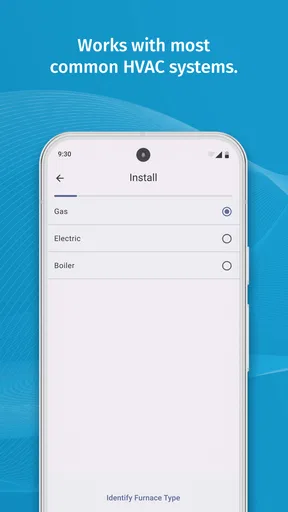
The most important early question is whether the home has a compatible Sensi thermostat. The app cannot create remote control on its own, so I would identify the thermostat model and follow the setup path presented by the app. That is a more sensible starting point than downloading it and assuming every heating and cooling system will appear automatically.
Once the thermostat is connected, the phone becomes the place for remote adjustments. I would keep the first session simple: confirm that the displayed home and thermostat are the correct ones, make a modest temperature change, and then check whether the physical thermostat reflects that change. This test is valuable because it separates setup problems from expectations about how quickly a home responds.
Even when the command is accepted, the room may not feel different immediately. A thermostat setting is not the same thing as instant room temperature. The system still has to operate, and the building has to respond. I would therefore judge the app by whether it communicates the requested control clearly, not by expecting the room to transform the moment I tap the screen.
A realistic evening use case
Imagine I leave work later than expected on a cold evening. The heating setting at home was chosen for an earlier arrival, but my schedule has changed. With Sensi, I can check the thermostat remotely and adjust the setting before I leave. When I arrive, I am not starting the decision from scratch in a cold house.
The same workflow works in reverse. If I leave in a hurry and later wonder whether the system is still set for comfort, I can check rather than worry. That does not mean I should make constant changes; frequent adjustments can be less useful than choosing a sensible routine. The benefit is the ability to correct a mistake or respond to a real change in plans.
Use the phone as a confirmation tool
One of the more useful ways to think about Sensi is as a confirmation tool. I can use it to verify the home’s comfort setting before making a decision, rather than blindly sending commands. That matters in shared homes, where another person may have changed the thermostat after I last saw it.
I would also avoid treating a remote setting as proof that every room feels identical. A thermostat generally reflects conditions around its own location, while bedrooms, upper floors, and sunlit rooms can feel different. Sensi can make control easier, but it cannot remove the physical differences inside a house. If one room is consistently uncomfortable, the problem may be airflow, insulation, or thermostat placement rather than a missing app feature.
Handling shared use without creating confusion
In a household with several people, the main practical challenge is coordination. Remote control is helpful when everyone understands that a change made on one phone affects the shared thermostat. I would agree on a simple routine: use the app for genuine schedule changes, and check the current setting before making another adjustment.
This is also where a physical thermostat keeps its importance. A guest or family member may not have the app, and someone standing beside the unit should still be able to use it. Sensi works best as an additional control point, not as a reason to ignore the people who are physically at home.
What I would check when something feels wrong
If a remote adjustment does not seem to have an effect, I would check the basics before blaming the app. I would confirm that I am viewing the right thermostat, look at the current setting again, and allow time for the system and room to respond. I would also compare the phone display with the physical unit when possible.
This approach prevents a common mistake: sending several commands because the first change did not produce an immediate sensation. Repeated taps do not make heating or cooling happen faster. A calm check of the displayed state is more useful than treating the app like an instant-action switch.
The best scenario is a changing schedule, not constant tinkering
I get the clearest value when my arrival time changes enough that a fixed daily routine cannot anticipate it. Rather than adjusting the temperature out of habit, I can check the setting when a real change in plans makes it relevant. If my schedule is steady and the wall control is convenient, I would expect less benefit; the tradeoffs help explain why.
Who gets the clearest everyday benefit
Sensi is at its best for people whose presence at home is unpredictable. Shift workers, commuters with variable hours, parents managing school and activities, and households divided between home and travel can all benefit from being able to check comfort remotely. The app is also convenient for anyone whose thermostat is physically inconvenient to reach.
I find the strongest use case is not “control everything from anywhere” as a slogan. It is one specific moment: my plan changes, and I want the home to reflect that change without waiting until I walk through the door. That is a small problem, but it happens often enough to make remote control feel worthwhile.
When the feature can reduce mental load
There is also a quiet benefit for forgetful routines. If I am already outside and cannot remember what setting I left behind, checking the app can settle the question. That is more useful than making a habit of turning the system off and on without knowing the actual state.
For people who travel, the same idea can help with confidence about the home’s setting. I would still treat remote control carefully and avoid making assumptions about the entire property based on one thermostat reading. The app can help me make a correction, but it does not replace sensible preparation for an empty home.
Why it may be less valuable for a fixed daily routine
If I leave and return at nearly identical times every day, and the thermostat is easy to reach, Sensi may not change much. A manual thermostat can be quicker than unlocking a phone, opening an app, and checking the current state. In that situation, the remote capability is available but not especially meaningful.
The same applies to someone who wants deeply automated climate management without manual decisions. Remote control is not the same as a fully personalized household system. If the main goal is extensive automation, a different thermostat ecosystem may be a better fit, provided its hardware and controls match the home.
The tradeoffs I noticed before recommending it
Before recommending remote control, I would consider the whole chain: a compatible thermostat, a usable phone, and a connection that lets the app reach the home device. If a command seems ineffective, I check the displayed setting and the physical thermostat when possible, then allow time for the system to respond instead of assuming the app can fix a hardware or comfort problem. This is a convenience layer, not a substitute for local control or troubleshooting.
The app depends on the thermostat and the connection
The biggest tradeoff is structural: the app’s usefulness depends on the compatible thermostat and the communication path between the phone, service, and home device. If any part of that chain is unavailable, remote control is less dependable. The physical thermostat remains important because it provides a local fallback for people at home.
This is why I would not present Sensi as a safety-critical control. It is a convenience tool for comfort. I would use it to make ordinary adjustments, but I would not rely on a phone command as the only way to protect a home, solve a hardware fault, or respond to an urgent heating or cooling problem.
Remote does not mean precise room-by-room control
Another limitation is the difference between controlling one thermostat and managing comfort throughout a property. Sensi is useful when the thermostat’s reading is a reasonable guide to the home. It is less satisfying in houses with large temperature differences between floors or rooms.
In that situation, the app can make the central setting easier to change, but it may also make the limitation more visible. I might adjust the temperature remotely and still find that a distant bedroom is uncomfortable. The right solution could involve the heating and cooling system itself, not another tap in the app.
The phone interface adds convenience and one extra step
Using a phone is convenient, but it is not frictionless. I need to find the device, open the app, and interpret the current setting. A wall control is already visible when I am standing in front of it. For a quick local change, the dedicated thermostat can win.
That tradeoff is easy to overlook when remote access sounds more advanced than it feels. I recommend Sensi for the moments when distance or timing is the problem. I would not recommend it solely to make a local temperature change more complicated.
Version and device requirements matter
The app is rated for Everyone, and its minimum operating-system requirement is version 10. That makes the age classification broad, but the device requirement still matters in practice. Before relying on it, I would confirm that the phone can run the current release and that the thermostat model is supported.
This is particularly important for an older phone kept as a household controller. An app can remain useful for years while the device used to run it becomes the limiting factor. I would check compatibility before treating Sensi as the permanent remote for the home.
Free does not mean the whole experience is hardware-free
The app itself is free, which lowers the barrier to trying it. However, the remote-control experience is tied to owning the appropriate thermostat. I would separate those two decisions: downloading the app costs nothing, but getting the intended benefit depends on the home’s equipment.
That distinction also helps avoid a common disappointment. Someone looking for a free way to control an unrelated thermostat will probably not get what they want here. Someone who already has the right Sensi hardware has a much clearer reason to install it.
Who gains the most from Sensi
The strongest fit is a household that already has compatible Sensi equipment and has a practical reason to check or adjust it while away, especially when plans vary. I would be less inclined to suggest it to someone seeking room-by-room climate management or elaborate automation, or to a household whose routine makes local thermostat controls sufficient. With that distinction in mind, it is easier to decide whether the app’s remote access will solve a real annoyance.
A strong match for practical remote adjustments
I would recommend Sensi to a person who already uses a compatible thermostat and regularly deals with changing arrival times, an awkward thermostat location, or uncertainty about the home’s current setting. It is also a sensible choice for households that want a straightforward lifestyle app focused on comfort rather than a broad smart-home dashboard.
The app’s value grows when remote access solves a repeated annoyance. If I use it once every few months, it is merely nice to have. If I use it whenever work runs late, plans change, or I leave home in a rush, it becomes part of a useful routine.
Who should choose another approach
I would steer someone toward a different option if their thermostat is not compatible, if they need room-by-room management, or if they want elaborate automation beyond direct remote adjustment. I would also hesitate if the thermostat is already easy to reach and the household has a stable schedule. In those cases, the app may add little beyond another way to perform a task that is already simple.
People who expect the app to diagnose heating and cooling faults should also set their expectations differently. Remote control can help reveal or correct a setting, but it is not a replacement for checking the physical system when the home is not comfortable.
My practical recommendation
I would begin by confirming the thermostat model and the phone’s operating-system compatibility. After setup, I would test one remote change while someone is at home, compare the app with the physical thermostat, and learn how long the home normally takes to respond. That small test gives a much more realistic picture than judging the app from its first screen.
I would then use it selectively: check before leaving, adjust when plans change, and confirm the setting before returning. That workflow keeps the remote feature useful without encouraging constant temperature chasing. It also respects the difference between a phone command and the slower physical process of heating or cooling a home.
Overall, I see Sensi as a focused convenience app rather than an all-purpose smart-home platform. Its best quality is the ability to make a compatible thermostat available when I am not standing beside it. Its weaknesses come from the same narrow design: it depends on the right hardware, does not solve uneven rooms, and can be unnecessary for a predictable household routine.
For the right home, that is enough. I would recommend it to anyone who wants simple remote comfort control without paying for the app itself, especially when an unpredictable schedule makes a wall-mounted thermostat feel too limited. If the home needs broader automation or more detailed climate management, I would look elsewhere. But for checking and changing a compatible Sensi setup from a phone, it delivers a clear, useful purpose.
Pros
- Simple interface that is easy to navigate
- Offers useful tools for everyday mobile use
- Runs smoothly on most compatible devices
- Settings can be adjusted to match personal preferences
- Regular updates may improve stability and functionality
Cons
- Some features may require in-app purchases
- Performance can vary depending on the device
- May use noticeable battery during extended sessions
- The free version may include advertisements
- Support options may be limited for certain issues
FAQs for Sensi
What is Sensi, and what is it used for?
Sensi is generally presented as a mobile tool related to gaming customization, especially for players who want to adjust touch sensitivity, aiming response, and control behavior. Its exact features can vary depending on the version and device. Before downloading, check the official store description carefully to confirm whether it works as a standalone utility, requires a specific game, or includes additional configuration options.
Is Sensi compatible with my Android or iPhone?
Compatibility depends on the particular Sensi app you intend to install, since several applications may use the same or a similar name. Review the operating-system requirements, supported Android or iOS version, device architecture, and available storage before installing. Some functions may also depend on screen size, refresh rate, permissions, or the game being used, so performance can differ between phones and tablets.
Can Sensi improve my gaming performance or guarantee better results?
Sensi may help users create more comfortable control settings, but it cannot guarantee improved accuracy, faster reactions, or better results in every game. The effect depends on your device, personal play style, existing sensitivity settings, and the game’s own controls. It is best used as a configuration aid rather than a shortcut, and you should test changes gradually so they do not make gameplay harder.
Is Sensi safe to download and does it require special permissions?
Safety depends on downloading the legitimate version from a trusted source, such as the official Google Play Store or Apple App Store. Check the developer name, ratings, reviews, privacy information, and requested permissions before installation. Be cautious if an unofficial version asks for unnecessary access, requests external downloads, or promises unrealistic advantages. Avoid modified APK files unless you fully understand the security risks involved.
Does Sensi cost money, contain ads, or require a subscription?
The pricing model can vary according to the specific Sensi listing and platform. Some versions may be free with advertising, while others can include optional purchases, premium settings, or subscription-based features. Before downloading, review the store page for in-app purchase details and cancellation terms. Also check whether important tools are available in the free version, because the advertised feature list may not represent the complete experience.


